> For the complete documentation index, see [llms.txt](https://docs.facephi.com/llms.txt). Markdown versions of documentation pages are available by appending `.md` to page URLs; this page is available as [Markdown](https://docs.facephi.com/docs.facephi-en/products/idv-suite/flujos-and-integraciones/configuracion-tecnica-del-cliente/sdk-mobile/idv-mobile/componente-documento.md).
# Component - Document
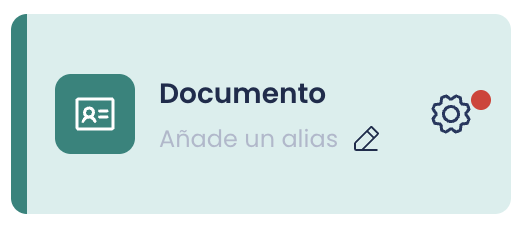
The Document Capture must be configured.
To do this, we click on the gear icon; if it has a red dot, it means there is a required parameter that is not configured and we will not be able to save the Flow.
#### Tutorial before capture
Type: Boolean
Default: Enabled
Parameter name in the SDK: *showTutorial*
If enabled, the mobile app will show an information icon (i) in the upper-right corner of the "Initial tip before capture" view; this button shows a more detailed tutorial on how to perform the capture.
#### Initial tip before capture
Type: Boolean
Default: Enabled
Parameter name in the SDK: *showPreviousTip*
If enabled, the mobile app will show a view with a short tutorial before the capture process starts.
#### Error diagnosis screen
Type: Boolean
Default: Enabled
Parameter name in the SDK: *showDiagnostic*
If enabled, the mobile app will show a view indicating the specific error that prevented the capture process from being completed. Each error is handled differently and some views will present buttons to close, retry, or even go to the device settings.
#### Preview captured image
Type: Boolean
Default: Enabled
Parameter name in the SDK: *showResultAfterCapture*
If enabled, the mobile app will show a view with the captured image so the user can confirm whether it looks correct or prefers to take it again.
#### Enable vibration during capture
Type: Boolean
Default: Enabled
Parameter name in the SDK: *vibrationEnabled*
If enabled, the mobile app will provide feedback to the user through haptic impulses (vibrations).
#### Document Capture assistant mode
Type: Boolean
Default: Enabled
Parameter name in the SDK: *wizardMode*
If enabled, the process is configured to capture both sides (front and back) of the document one after the other. In this mode, the widget would only be launched once and when it finishes capturing the front, it would continue immediately with the back if the document has one.
#### Document scanning mode
Type: Selector
Default: Search mode
Parameter name in the SDK: *scanMode*
Indicates the OCR document scanning mode. Depending on the choice, several types of documents or one specific document will be scanned and searched for. This mode can be of three types:
* **Generic mode (*****MODE\_GENERIC*****)**: allows any type of document to be scanned regardless of the country or document type. The result of this mode is not as precise as the following ones, but it allows multiple standard documents to be scanned.
* **Search mode (*****MODE\_SEARCH*****)**: will allow the use of a whitelist and blacklist, and will search in documents that meet those conditions. These conditions are indicated in the "Country" variable (*specificData*). This allows the search to be narrowed by reducing the number of templates, making the search much more precise than in the generic case.
* **Specific mode (*****MODE\_SPECIFIC*****)**: Search for a specific document. These conditions are indicated in the "Country" property (*specificData*) shown below.
### No document selector
#### Country
Type: String
Default: ES|\
Parameter name in the SDK: *specificData*
This property allows you to define which documents will be scanned during the process, if the scanning mode is declared *match* or *specific*. The example *ES|\* indicates that it will scan for **all** documents issued by Spain.
The country key must be its ISO2.
#### Document type
Type: Selector
Default: ID Card
Parameter name in the SDK: *documentType*
The type of document to be read.
* **ID Card**: The widget is configured to capture identity documents.
* **Passport**: The widget is configured to capture passports.
* **Visa**: The widget is configured to capture visas.
* **Driver's license**: The widget is configured to capture driver's licenses.
* **Foreign resident card**: The widget is configured to capture foreign documents.
* **Credit card**: The widget is configured to capture credit cards.
* **Custom**: The widget is configured to capture other types of documents that do not correspond to any of the previous categories.
### With document selector
#### **showDocumentSelector**
Type: Boolean
Default: *false*
Parameter name in the SDK: *showDocumentSelector*
Activation of the document selector view. It will be displayed as soon as the controller is launched.
#### **enabledCountries**
Type: Array of Strings \[String]
Default: *null*
Parameter name in the SDK: *enabledCountries*
List of countries in ISO2 that will appear in the selector. If its value is null or does not contain valid values, all those available by the SDK will be shown.
#### **enabledDocumentTypes**
Type: Array of Strings \[String]
Default: *null*
Parameter name in the SDK: *enabledDocumentTypes*
List of document types that will appear in the document type selector. If its value is null or does not contain values, all those available by the SDK will be shown.
### Advanced parameters
#### Side to capture
Type: Selector
Default: Front
Parameter name in the SDK: *documentSide*
The side of the document with which capture begins. This parameter does NOT define whether only one side or both sides will be captured.
#### Resources file
Type: String
Default: *empty - FILL IN*
Parameter name in the SDK: *resourcesPath*
The name of the zip file that is delivered together with the dependency of FPHISelphIDWidget. This file must be found with that same name among the assets of the application that integrates the Flow.
The structure of the zip names that are usually published is resources-${PRODUCT}-{$VERSION}.zip (i.e. *resources-selphid-2-0.zip)*
#### Enable debug mode
Type: Boolean
Default: Disabled
Parameter name in the SDK: *debug*
If enabled, the capture will be performed in *debug.*
#### Maximum capture time
Type: Selector
Default: Medium
Parameter name in the SDK: *error*
The time that elapses from when capture starts until an error due to *Timeout.*
*Short 15s - Medium 20s - Long 25s - Very Long 60s*
#### Token image quality
Type: Float
Default: *empty - The SDK will use 0.95*
Parameter name in the SDK: *tokenImageQuality*
Decimal value between 0 and 1 that indicates the compression of the tokenized image used for verification services.
#### Video file path
Type: String
Default: *empty*
Parameter name in the SDK: *videoFilename*
If the value is different from empty, the Document Capture process will be recorded as an .mp4 at the indicated path, so the integrator can retrieve it by accessing it.
#### Parameters\*
Type: Dictionary \
Default: *empty*
Parameter name in the SDK: *params*
This dictionary is for specific configurations and should only be used when indicated by Facephi due to a special use case.