> For the complete documentation index, see [llms.txt](https://docs.facephi.com/llms.txt). Markdown versions of documentation pages are available by appending `.md` to page URLs; this page is available as [Markdown](https://docs.facephi.com/docs.facephi-en/products/idv-suite/flujos-and-integraciones/configuracion-tecnica-del-cliente/sdk-mobile/idv-mobile/componente-selphi.md).
# Component - Selphi
Face Capture must be configured.
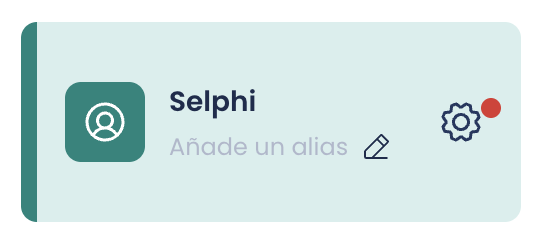
To do this, we click the gear icon; if it has a red dot, it means there is a required parameter that is not configured and we will not be able to save the Flow.
#### Tutorial before capture
Type: Boolean
Default: Enabled
Parameter name in the SDK: *showTutorial*
If enabled, the mobile app will show an information icon (i) in the upper-right corner of the "Initial tip before capture" view; this button shows a more detailed tutorial on how to perform the capture.
#### Initial tip before capture
Type: Boolean
Default: Enabled
Parameter name in the SDK: *showPreviousTip*
If enabled, the mobile app will show a view with a brief tutorial before starting the capture process.
#### Error diagnosis screen
Type: Boolean
Default: Enabled
Parameter name in the SDK: *showDiagnostic*
If enabled, the mobile app will show a view indicating the specific error that prevented the capture process from being completed. Each error is handled differently, and some views will present buttons to close, retry, or even go to the device settings.
#### Preview captured image
Type: Boolean
Default: Enabled
Parameter name in the SDK: *showResultAfterCapture*
If enabled, the mobile app will show a view with the captured image so the user can confirm whether it looks correct or prefers to retake it.
#### Enable vibration during capture
Type: Boolean
Default: Enabled
Parameter name in the SDK: *vibrationEnabled*
If enabled, the mobile app will give the user feedback through haptic feedback (vibrations).
#### Resource file
Type: String
Default: *empty - FILL IN*
Parameter name in the SDK: *resourcesPath*
The name of the zip file delivered with the FPHISelphiWidget dependency. This file must be found with the same name among the assets of the application that integrates the Flow.
The structure of the zip names that are usually published is resources-${PRODUCT}-{$VERSION}.zip (i.e. *resources-selphi-2-0.zip)*
#### Enable pre-stabilization
Type: Boolean
Default: Disabled
Parameter name in the SDK: *stabilizationMode*
If enabled, the capture establishes a stabilization mode before any process in the widget. With this mode, the widget is forced not to start any process if the user is not facing forward with their head and without moving it.
#### Optimize face template
Type: Boolean
Default: Disabled
Parameter name in the SDK: *templateRawOptimized*
If enabled, the face template is optimized to reduce its size.
#### Enable debug mode
Type: Boolean
Default: Disabled
Parameter name in the SDK: *debug*
If enabled, the capture will be done in *debug.*
#### Liveness check mode
Type: Selector
Default: Passive
Parameter name in the SDK: *livenessMode*
Sets the life validation mode of the Face Capture process:
* **NONE**: Indicates that photo detection mode should not be activated in authentication processes.
* **MOVE**: Indicates that active motion detection mode should be activated.
* **PASSIVE**: Indicates that the liveness check will be performed on the server, sending the “bestImage” or the corresponding “tokenTemplateRaw”
#### Full screen
Type: Boolean
Default: Enabled
Parameter name in the SDK: *fullscreen*
If enabled, the capture process is done full screen. Currently it is the only available mode.
#### Enable camera flash
Type: Boolean
Default: Disabled
Parameter name in the SDK: *cameraFlashEnabled*
Turns on the device flash. Combine with the camera selection parameter.
#### Face crop percentage
Type: Float
Default: *0,9*
Parameter name in the SDK: *cropPercent*
Decimal value between 0 and 1 that indicates the cropping percentage that will be applied to the originally captured facial image.
#### Select camera
Type: Selector
Default: Front
Parameter name in the SDK: *cameraPreferred*
Sets whether Face Capture will be done with the front or rear camera.
#### Video file path
Type: String
Default: *empty*
Parameter name in the SDK: *videoFilename*
If the value is different from empty, the document capture process will be recorded as an .mp4 at the indicated path, so the integrator can obtain it by accessing it.
#### Parameters\*
Type: Dictionary \
Default: *empty*
Parameter name in the SDK: *params*
This dictionary is for specific configurations and should only be used when indicated by Facephi due to a special use case.