> For the complete documentation index, see [llms.txt](https://docs.facephi.com/llms.txt). Markdown versions of documentation pages are available by appending `.md` to page URLs; this page is available as [Markdown](https://docs.facephi.com/docs.facephi-en/sdks/sdk-mobile/android-sdk/personalizacion.md).
# Customization
This guide explains how to customize the SDK appearance in your Android applications. It is recommended to apply the modifications in both the light and dark (night) themes.
## Colors and logo
To change the main colors and the SDK logo:
1. Create a file `sdk_styles.xml` in the client application.
2. Add or modify the value *hex* (RGB) color and logo:
```xml
#7636FC
#03DAC5
#FFFFFF
#DD3631
#1D2C4D
#526080
#07A13A
#202C4B
#EA7547
#243760
#FFFFFF
32dp
@drawable/ic_demo_logo
```
* The **main colors** that also affect animations are:\
`sdkPrimaryColor`, `sdkErrorColor`, `sdkSuccessColor`, `sdkNeutralColor`, `sdkAccentColor`.
* To include the **logo** you need to add the following line in the file, with the configured name.
```xml
@drawable/logo_name
```
The recommended format is **vector (.xml).**
{% hint style="info" %}
The Selphi and SelphID components come with their associated resource zip, which remains separate from this SDK feature.
{% endhint %}
## Animations
Lottie files can be overwritten by placing the new files in `res/raw/` with the same names:
```
anim_cancelled.json
anim_success.json
```
## Text
Create an XML file with the strings to overwrite:
```xml
Finish the process
Do you want to finish the process?
Finish
Cancel
In order to continue, <b>you need to allow access to the camera</b>.
In order to continue, you need to allow access to the camera.
Permission denied
In order to continue, <b>you need to allow access to the permission needed.</b>
In order to continue, you need to allow access to the permission needed.
In order to continue, <b>allow access to the microphone.</b>
In order to continue, allow access to the microphone.
Retry
Go to settings
Close process
Show tutorial
Finish
Retry
SKIP
Skip advices
NEXT
Next advice
PREVIOUS
Previous advice
FINISH
Finish advices
Check your internet connection
Check that your connection is stable and try again.
Time exceeded
We apologize. The capture could not be made
There was a technical problem
We apologize. The capture could not be made
```
## Fonts
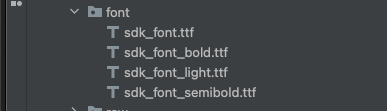
* Add the files `.ttf` in the folder `res/font/`.
* Assign the **exact name** expected by the SDK. If the name does not match, the font will not be applied.
## Top bar icons
To customize the top bar icons, create the resources in `res/drawable/` with the following names:
```
ic_fphi_close_arrow
ic_fphi_close
ic_fphi_info
```
## Images for the permission request and diagnostics screens
To customize the images that appear on the permission request and diagnostic screens, create the resources in `res/drawable/` with the following names:
```
ic_fphi_camera_permission
ic_fphi_connection_error
ic_fphi_mic_permission
ic_fphi_timeout_error
ic_fphi_error
ic_fphi_support
```